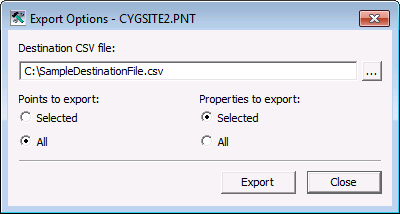
Use the Point Configuration Manager utility to export point configuration data to a .csv file to be used for creating new points or updating existing points.
Alternatively, some import/export functions can be performed using a command prompt. See Using Command-Line Parameters for more information about this option.
Use the Export option to export existing point configuration data to a .csv file. The data included in the export is as configured in the export options, based on the configuration data available for the points contained in the filtered results list.
Note: Ensure that your export contains the configuration data intended before taking action to export. Because data is retrieved when the utility filter is initially resolved, it is recommended that you verify that the data in your view is still current to avoid unintentional reversion of any subsequent changes that may have been made. See Filtering and Viewing Points for more information.
To Export Points to a CSV File
Note: ID values are not exported. The column is included but the values are not, since a Point ID cannot be changed once the point has been created.

|
|
|

